I was able to get Hamclock up and running in Christmas Eve just in time to see the Santa tracker. Very nice edition to the shack — its a fully configurable kiosk-style application that provides real time space weather, radio propagation models, operating events and other information particularly useful to the radio amateur. I’ve been running Hamclock in a full screen in a Chrome browser window (F11 toggles full screen). Its FB to access from my tablet in addition to the host PC on my local private network. With a few commands provided in the step by step guide by W4CAE you can run HAMCLOCK on Windows 10 / 11 using the Ubuntu WSL. To learn more about Windows Linux Subsystem (WSL), click https://learn.microsoft.com/en-us/windows/wsl/about . My version is compiled and installed using the hamclock-web-1600x960 web server only parameters. For reference http://127.0.0.1:8081/live.html . Use port 8082 for RO interface if you should want to make ...
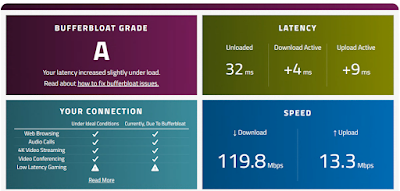
Network quality is the biggest issue I’ve had when accessing the Flexradio remotely - via hotel WiFi or the LTE connection on my tablet hotspot. I see a lot of dropped packets, especially in the RX audio, which causes the audio to become scrambled from the radio, and generates a lot of snap-crackle-pop in the audio on the tablet. Performance can be improved by reducing bufferbloat in the router (latency and jitter) and by eliminating network packet fragmentation because of the MTU. I've gotten rid of bufferbloat on my remote network by enabling the Smart Queue Management function in my Ubiquiti Networks EdgeRouter X, 4-Port Gigabit Router. The ER-X runs EdgeOS and is easy to enable with the basic functions, but with some testing and tweaking of the additional parameters I've found these settings work best for my network. Nextlink is my Wireless ISP, and I have a static IP set up. Per the waveforms website, with SQM enabled an EdgeRouter 4 can su...
After installing Windows 11 cumulative update KB5079473, my station entered a failure state that broke multiple layers of the OS — and completely crippled SmartSDR, DAX, and CAT. This was not a typical “DAX driver didn’t install” situation. This was a deep Windows subsystem failure involving: DAX audio endpoint enumeration SmartSDR installation CAT virtual serial ports Windows AppX provisioning Microsoft Store Snipping Tool Audio endpoint registration (MMDevice) Add-AppxPackage / Remove-AppxPackage failures Root Cause: camsvc (Capability Access Manager Service) was disabled and corrupted This service is responsible for: App capability registration AppX manifest processing System app initialization Store app provisioning Capability extensions used by audio and device registration When camsvc is broken, Windows cannot: Register DAX endpoints Install SmartSDR cleanly Register system apps Install Store apps Rebuild AppX ...


Comments